Using DiscountFix with Shopify Flow
Send unique codes automatically, create a personal discount for each customer, refill code pools before they run out, and react when a code is used. Everything below is written for merchants; you don't need to write any code.
Overview
DiscountFix adds 5 actions and 4 triggers to Shopify Flow. Actions are steps your workflow runs. Triggers are events that start a workflow.
Before you start
- Install Shopify Flow from the Shopify App Store if you haven't already.
- Install DiscountFix and open it once from your Shopify admin. Opening it connects your store so Flow can reach the app.
- For the code pool actions (Reserve, Generate more, Extend end date), create a discount set in DiscountFix first. Create a personal discount doesn't need a set.
- In Flow, click Create workflow, choose a trigger, then click + → Action and search for DiscountFix.
Every action returns data, such as the reserved code. Later steps can use it. In any text field of a later step (like an email body), click Add a variable and choose it from the DiscountFix step. Flow inserts the right variable name for you, so you don't have to type it.
Key concepts
Discount set
A discount set is one discount in Shopify with many codes. All its codes share the same rules (value, products, dates, minimum). You create sets in DiscountFix on the Discount codes page (see Create a discount set).
Set ID
Each set has a numeric ID. It appears under the set title on the Discount codes page as ID: 1234. The Flow actions ask for it in their Discount set field.
Reserve a unique discount code also accepts the set's exact title. Generate more discount codes and Extend a discount set's end date accept only the numeric ID. The ID never changes, while titles can be renamed, so we recommend the ID everywhere.
Code pool
The pool is every code in a set that is still available to hand out. A code is available when it is unused, still active and not yet reserved. When you add codes to a set with Add codes or the Generate more action, they join the same pool. One Set ID covers all of them.
Reservation
When Reserve a unique discount code gives a code to a customer, the code is reserved. It is never handed out again, even though the customer hasn't used it yet. You can see who got which code on the set's Reserved codes screen.
Reserve a code, or create a personal discount?
Both actions give a customer a code of their own. They work differently:
| Reserve a unique discount code | Create a personal discount | |
|---|---|---|
| Where the code comes from | An existing set you created in the app | A brand-new Shopify discount is created on every run |
| Discount rules | Everything the set supports: products, collections, markets, segments, minimums, combinations, free shipping… | Simple: a percentage or fixed amount off the whole order, with an optional minimum and expiry |
| Value per customer | The same for everyone in the set | Can be different on every run, for example based on the order total |
| Code text | Random codes from the set | You write it, and it can include customer data, e.g. THANKS-{{customer.firstName}} |
| Speed | Instant (the codes already exist) | Instant |
| Monthly code allowance | Not used by reserving. The codes counted when the set was created. | 1 code per run |
| If it runs out | Fails when the pool is empty. Refill it with Generate more discount codes. | Never runs out (within your plan's allowance) |
| Where to see them in the app | The set's Reserved codes screen | The Flow Discounts page |
Rule of thumb: use Reserve when the discount has rules beyond "X off the order" or is part of a campaign. Use Personal discount when the value or code text depends on the customer or the order.
Actions
Each action below lists its fields, the data it returns, and when it fails.
Reserve a unique discount code Action
Takes one unused code from a bulk discount set and assigns it to a single recipient. The code is never handed out again.
Fields
| Field | Required | What to enter |
|---|---|---|
| Customer | No | The customer receiving the code. Pick it from the trigger (e.g. the order's customer). It is recorded so you can see who got which code, and it powers Reuse the code this customer already has. You can leave it empty, for example for a code sent to a non-customer email address. |
| Discount set | Yes | The set's numeric ID (recommended) or its exact title. |
| Reuse the code this customer already has | No | When on, a customer who already received a code from this set gets the same code again instead of a new one. The earlier code is returned only while it is still unused. Useful when the trigger can fire several times for one customer. A code whose Valid for (days) has run out is never returned again. |
| Valid for (days) | No | The code stops working this many days after it is given out, e.g. 7 for a one-week welcome code. Within an hour of expiring, an unused code is removed from the Shopify discount; a code the customer already used is left alone. If the set itself ends sooner, the set's end date wins. Leave empty to use only the set's end date. |
| Expires on | No | A calendar end date instead of a number of days: end of month, end of next month, or a date like 2026-12-31. The code stops working at 23:59:59 on that day, in your store's time zone. Example: a code given out on October 19 with end of next month expires on November 30. When filled in, it replaces Valid for (days). Unused codes are removed the same way, and the set's end date still wins if it comes first. |
Returned data (use in later steps)
| Variable | Type | Meaning |
|---|---|---|
code | Text | The discount code to give to the customer. |
setTitle | Text | Title of the set the code came from. |
setId | Text | ID of that set. |
expiresAt | Text | When the code stops working (ISO 8601, UTC): the earlier of the set's end date and Valid for (days) or Expires on. Empty if none is set. |
maxUsage | Number | How many times the code can be used. Empty if unlimited. |
remaining | Number | Unused codes left in the set after this one. Counting stops at 10,000. |
remainingCapped | True/false | True when more than 10,000 codes are left, so remaining shows 10,000. |
reused | True/false | True when the customer's existing code was returned instead of a new one. |
Good to know
- Retries never waste codes. If Flow retries the same run, it gets the same code back.
- Codes are handed out one at a time. Two workflows running at the same moment never get the same code.
- When the pool is empty, the step fails and Flow does not retry it. Pair it with the Set running low trigger to refill in time.
- The code works exactly as the set is configured in Shopify: products, minimums, dates, usage limits and combinations all apply.
Create a personal discount Action
Creates a new single-code discount for one customer, with the code text and value you choose in the workflow.
Fields
| Field | Required | What to enter |
|---|---|---|
| Customer | No | The customer the code is for. It is recorded with the discount so you can see it on the Flow Discounts page. |
| Discount code | Yes | The code text. You can use Flow variables and the {RANDOM} placeholder, e.g. WELCOME-{{customer.firstName}} or VIP-{RANDOM}. See the rules below. |
| Always add a random block | No | Adds a random 4-character block to the end of every code. Recommended when your code uses a customer variable, so two customers named "Anna" don't clash. |
| Percentage discount | No | Tick for a percentage off. Leave unticked for a fixed amount off in your store currency. |
| Discount value | Yes | 20 means 20% when ticked, or 20 off in your currency when not. Must be above 0, and at most 100 for percentages. You can use a variable here, e.g. a value you calculated in a Run code step. |
| Minimum purchase amount | No | Order subtotal required before the code applies. |
| Valid for (days) | No | The code stops working this many days after it is created. Leave empty for no end date. |
| Expires on | No | A calendar end date instead of a number of days: end of month, end of next month, or a date like 2026-12-31. The code stops working at 23:59:59 on that day, in your store's time zone. Example: a code given out on October 19 with end of next month expires on November 30. When filled in, it replaces Valid for (days). |
| Times the code can be used | No | Total uses. Defaults to 1. |
What the discount looks like in Shopify
- An amount off the order, applied to all products. It starts immediately.
- Titled
Flow: YOUR-CODEin Shopify's Discounts page. - Limited to one use per customer, and Times the code can be used in total.
- Doesn't combine with other product, order or shipping discounts.
Shopify's current discount API can't restrict a code to one named customer. The code is personal because only that customer receives it, it is hard to guess, and it can be used once. If the customer forwards it, someone else could use it once. If you need a hard restriction, use Reserve with a set that targets a customer segment instead.
How the code text is cleaned up
- Converted to UPPERCASE. Accented letters become plain ones (
Ayşe→AYSE,José→JOSE). - Spaces become
-. OnlyA–Z,0–9,-,_and.are kept. Repeated separators are merged. {RANDOM}is replaced with 4 random characters. You can put it anywhere in the code.- If a variable comes out empty (e.g. the customer has no first name, so
WELCOME-is left), or the code is shorter than 4 characters, a random block is added. You never get a broken code likeWELCOME-. - If the code already exists in your store, a random block is added and it is tried once more.
- The maximum length is 60 characters.
Returned data
| Variable | Type | Meaning |
|---|---|---|
code | Text | The code that was actually created. Always use this, not the text you typed, because a random block may have been added. |
suffixed | True/false | True when the code you asked for was taken and a random block was added. |
randomised | True/false | True when a random block was added because the code was empty, too short, contained {RANDOM}, or you asked for one. |
setId | Text | ID of the discount in DiscountFix. |
expiresAt | Text | When the code stops working (ISO 8601, UTC). Empty with no end date. |
monthlyRemaining | Number | Codes left in your monthly allowance. Empty on the Unlimited plan. |
Each run uses 1 code from your monthly allowance. When the allowance is used up, the step fails with "Monthly code limit reached" and Flow doesn't retry it.
Generate more discount codes Action
Queues new codes for an existing set, reusing its code format. Refills a pool that the reserve action is using up.
Fields
| Field | Required | What to enter |
|---|---|---|
| Discount set | Yes | The set's numeric ID. From the Set running low trigger, just pick its Set ID variable. |
| How many codes | Yes | 1 to 50,000 per run. They count toward your monthly code allowance. |
Returned data
| Variable | Type | Meaning |
|---|---|---|
queued | Number | How many codes were queued. |
setTitle | Text | Title of the set the codes are added to. |
setId | Text | ID of that set. |
monthlyRemaining | Number | Allowance left after this batch. Empty on the Unlimited plan. |
Good to know
- Generation happens in the background. The step finishes as soon as the codes are queued. Creating them in Shopify can take a few minutes for large batches. Use the Batch finished trigger if you need to know when they're ready.
- New codes use the same format as the set: length, prefix, suffix, characters and separators. They share the set's discount rules.
- If the batch is bigger than your remaining monthly allowance, nothing is queued and the step fails. The error tells you how many codes you have left.
- You can't add codes to a set whose generation failed. A set that is still being generated makes the step wait: Flow retries it automatically.
Extend a discount set's end date Action
Pushes a set's end date forward by a number of days. If the set has no end date yet, one is set that many days from today.
Fields
| Field | Required | What to enter |
|---|---|---|
| Discount set | Yes | The set's numeric ID. From the Set expiring soon trigger, pick its Set ID variable. |
| Days to add | Yes | A whole number from 1 to 3650. |
How the new date is calculated
| Current end date | New end date |
|---|---|
| In the future | Current end date + days |
| Already passed | Today + days (so the codes work again) |
| No end date | Today + days. This gives the set an end date it didn't have before. |
The time of day stays the same (23:59 if none was set). Days are counted in the set's own timezone. The start date doesn't change. The end date is updated both in Shopify and on every code in DiscountFix.
Returned data
| Variable | Type | Meaning |
|---|---|---|
setTitle | Text | Title of the set. |
setId | Text | ID of the set. |
endsOn | Text | The new end date, YYYY-MM-DD, in the set's timezone. |
endsAt | Text | The end time on that date, HH:MM. |
daysAdded | Number | How many days were added. |
Running the step only once per workflow run is guaranteed: if Flow retries, the days are not added twice.
Release a reserved discount code Action
Puts a reserved code back into the pool so it can be handed to someone else. Unused codes only.
Fields
| Field | Required | What to enter |
|---|---|---|
| Discount code | Yes | The code to release. Usually this is the code variable from an earlier Reserve step, or a code you saved on the customer or order. |
Returned data
| Variable | Type | Meaning |
|---|---|---|
code | Text | The code you asked to release. |
released | True/false | True when the code went back into the pool. |
reason | Text | Why it wasn't released: CODE_NOT_FOUND, NOT_RESERVED (it was never reserved or was already released) or ALREADY_USED (the customer used it). Empty on success. |
A code that can't be released does not fail the step. It returns released = false with a reason, so you can add a condition on it.
Triggers
A trigger starts every workflow that uses it. Field names below are exactly what you'll see in Flow's variable picker.
Discount code redeemed Trigger
Fires when a code created with DiscountFix is used on an order.
When it fires: within seconds of the order being created. This covers bulk codes, reserved codes and personal discounts. It fires once per code per order, so if an order uses two DiscountFix codes, the workflow runs twice.
| Field | Type | Meaning |
|---|---|---|
| Customer | Customer | The customer who placed the order, with all customer data (email, tags, amount spent…). Empty for guest checkouts. |
| Order | Order | The order, with all order data. |
| Code | Text | The code that was used. |
| Discount set | Text | Title of the set the code belongs to. |
| Discount amount | Number | How much the code took off this order. |
| Currency | Text | Currency of that amount. |
| Times used | Number | Total uses of this code so far, including this one. Useful for multi-use codes ("on the 3rd use, do X"). |
If your workflow uses customer data (tags, email, metafields), add a condition right after the trigger: Customer exists. Otherwise those steps fail on guest orders.
Discount set running low Trigger
Fires when a discount set is running out of unused codes.
- Only for sets you hand out with the Reserve action. A set needs at least one reserved code to be watched. Sets you only export or share manually never fire it.
- "Low" means the available codes have fallen to 10% of the set's total or 25 codes, whichever is higher. It is never above 25% of the total, so small sets aren't flagged all the time. Example: a 1,000-code set fires at 100 left. A 100-code set fires at 25 left. A 40-code set fires at 10 left.
- Checked every hour. It fires at most once every 24 hours per set. Once you refill the set above the threshold, it can fire again the next time it gets low.
- A completely empty set reminds you at most once a week. Sets whose end date has passed are skipped.
| Field | Type | Meaning |
|---|---|---|
| Discount set | Text | Set title. |
| Set ID | Text | Set ID. Pass it straight to Generate more discount codes. |
| Codes left | Number | Available codes remaining. |
| Codes total | Number | All codes in the set, including added ones. |
Discount code batch finished Trigger
Fires when a batch of discount codes has finished generating, whether it succeeded or failed.
- Covers sets created in the app, codes added with Add codes, and batches from Generate more discount codes.
- Checked every hour, so it can arrive up to an hour after the codes are ready. It fires once per batch.
- Only batches created in the last 2 days are considered. It doesn't fire for older sets.
| Field | Type | Meaning |
|---|---|---|
| Discount set | Text | Title of the batch. |
| Set ID | Text | ID of the batch. |
| Status | Text | completed or failed. Branch on this with a condition. |
| Codes requested | Number | How many codes were asked for. |
| Codes generated | Number | How many were created in Shopify. |
| Codes rejected | Number | How many Shopify refused (for example, a specific code that already exists). |
Discount set expiring soon Trigger
Fires when a discount set is within a week of its end date.
- Checked every hour. It fires once per set when fewer than 7 days are left.
- If you extend the set (in the app or with Extend a discount set's end date), it can fire again when the new end date gets close.
- Sets without an end date never fire it.
| Field | Type | Meaning |
|---|---|---|
| Discount set | Text | Set title. |
| Set ID | Text | Set ID. Pass it to Extend a discount set's end date. |
| Ends at | Text | End date and time (ISO 8601, UTC). |
| Days left | Number | Days until the end date. Easier to use in conditions than Ends at. |
| Codes left | Number | Unused codes remaining. |
Codes made with Create a personal discount are single discounts, not sets. They never fire Running low, Batch finished or Expiring soon.
Reserved discount code expired Trigger
Fires when a code handed out with Valid for (days) reaches its deadline unused and is removed.
- Only for codes reserved with a deadline. It fires for codes given out by Reserve a unique discount code with Valid for (days) or Expires on filled in. Codes without a deadline, and the set's own end date, never fire it.
- Only for unused codes. A code the customer already used is left alone, so it doesn't fire.
- Checked every hour. It fires once per code, within about an hour of the deadline, right after the code is removed from the Shopify discount.
- Use it to send the customer a fresh code, or to tag customers who let their code lapse.
| Field | Type | Meaning |
|---|---|---|
| Customer | Customer | The customer the code was reserved for, with all customer data. Empty if the code was reserved without a customer. |
| Code | Text | The code that expired. It no longer works. |
| Discount set | Text | Title of the set the code came from. |
| Set ID | Text | Set ID. Pass it straight to Reserve a unique discount code to give out a new one from the same set. |
| Reserved at | Text | When the code was given out (ISO 8601, UTC). |
| Expired at | Text | The code's deadline (ISO 8601, UTC). |
| Codes left | Number | Unused codes still available in the set. Check it is above 0 before reserving a new one. |
Shopify has no per-code expiry inside a shared discount, so an expired code is deleted from the discount. At checkout the customer sees Shopify's "Enter a valid discount code" message, not "expired". If you want the customer to know why, say so in the email that brings the new code.
Discount code possibly leaked Trigger
Fires when a code you gave to one customer is used by a different customer.
- Covers codes handed out with Reserve a unique discount code (with a customer) and Create a personal discount.
- Checked every hour. It fires once per code. Guest checkouts can't be compared and never fire it.
- The same alert appears in the app under Code safety, where you can disable the code.
| Field | Type | Meaning |
|---|---|---|
| Customer | Customer | The customer who used the code. |
| Order | Order | The order the code was used on. |
| Code | Text | The code. |
| Discount set | Text | Title of the set the code came from. |
| Set ID | Text | Set ID. |
| Reserved for | Text | Shopify customer ID of the customer the code was given to. |
Example: Discount code possibly leaked → Add order tags leaked-code → Send internal email, so your team can review the order before it ships.
Ready-made templates
Four of the workflows below are also Flow templates, so you don't have to build them. In Flow, click Browse templates and search for DiscountFix or the template name. A template opens as a draft; check the steps marked Review, then turn it on.
| Template | What it does | Fill in before turning it on |
|---|---|---|
| Give new customers a unique welcome discount code | Reserves one code for every new customer, saves it on the customer (metafield custom.welcome_discount_code) and adds the tag welcome-code. The code expires 30 days after it is given. | Your set's ID in the Reserve step. Then send the code from your email tool (see recipe 1). |
| Refill a discount code set when it runs low | Adds 500 codes to any set that is running low. | Nothing. Change 500 to fit your plan's monthly allowance. |
| Keep a discount campaign running while codes are left | Pushes the end date out by 30 days when a set ends within a week and still has unused codes. | Nothing. Change the number of days if you like. |
| Get an email when discount code generation fails | Emails your team the set name and code counts when a batch fails. | Your team's email address in the email step. |
The templates appear in Flow once Shopify has reviewed them.
Workflow recipes
Ready-made workflows for the most common requests. Build them step by step in Flow. Names in italics are what you search for when adding the step.
1. Send every new customer a unique welcome code
- In DiscountFix, create a set (e.g. Welcome 10%) with enough codes. Note its ID.
- Trigger: Customer created.
- Optional condition: the customer accepts email marketing.
- Reserve a unique discount code: Customer = the trigger's customer, Discount set = your ID, Reuse the code this customer already has = on. Optional: Valid for (days) =
7to make it a one-week code (see below). - Send the code with your email tool's Flow action (Shopify Messaging, Klaviyo, etc.). Insert the code with Add a variable → the Reserve step →
code.
Make the code expire N days after it is sent. Enter a number in Valid for (days). Each customer's code then has its own deadline, counted from the moment the workflow gave it out. Customer A who signed up on Monday and customer B who signed up on Friday both get a full 7 days. To tell the customer the deadline, add the Reserve step's expiresAt variable to the email, next to code (e.g. "Your code … is valid until …"). The value is in UTC (e.g. 2026-10-06T10:14:03Z); Flow's date filter can format it.
Make the code expire at the end of next month. Use Expires on = end of next month instead of Valid for (days). A code given out on October 19 then works until November 30, and one given out on November 2 until December 31, in your store's time zone. This fits "thank you for your order" codes: trigger Order created, leave Reuse the code this customer already has off so every order gets a new code.
- Within an hour after the deadline, an unused code is removed from the Shopify discount and stops working. On the set's Reserved codes page it shows as Expired.
- A code the customer already used is left alone.
- If the set itself ends sooner, the set's end date wins, and
expiresAtshows that date. - With Reuse the code this customer already has on, an expired code is never returned again; the customer gets a new one.
- To send a new code automatically when one expires unused, add recipe 7.
Add recipe 2 so the pool never runs dry.
2. Refill a code pool automatically
- Trigger: Discount set running low.
- Optional condition:
Set IDequals your welcome set's ID, if only some sets should refill. - Generate more discount codes: Discount set = the trigger's
Set ID, How many codes = e.g. 500.
To be told when something goes wrong, add a second workflow:
Refills count toward your plan's monthly code allowance. If a refill is larger than what's left, it fails with "Monthly code limit reached". Choose a batch size that fits your plan, or upgrade to Unlimited.
3. Keep a campaign running while codes are left
In the Else branch, you could send yourself an internal email instead ("Campaign X ends in {{Days left}} days").
4. Reward a purchase with a personal code
Example: give a $25 code to customers who buy 5 or more sample products.
Flow's line-item conditions check each line on its own and don't add quantities up. Five different samples are five lines with quantity 1 each, so "quantity ≥ 5" never matches. The Run code step below adds them up.
- Trigger: Order created.
- Add Run code and fill in its three boxes. This version counts a line as a sample when its product is tagged
sampleor its variant title contains "sample". Change both to match your store.Define inputs:
query {
  order {
    lineItems {
      currentQuantity
      variantTitle
      product { tags }
    }
  }
}
Define outputs:
type Output {
  sampleCount: Int!
}
Write code:
export default function main(input) { const TAG = "sample"; // product tag const WORD = "sample"; // text in the variant title const lines = input?.order?.lineItems ?? []; const sampleCount = lines.reduce((sum, line) => { const tags = (line.product?.tags ?? []).map((t) => t.toLowerCase()); const title = (line.variantTitle ?? "").toLowerCase(); // A line matching both rules is still counted once. if (tags.includes(TAG) || title.includes(WORD)) { return sum + (line.currentQuantity ?? 0); } return sum; }, 0); return { sampleCount }; }currentQuantityleaves out items already removed from the order. The?.checks keep the step from failing on a line whose product was deleted. - Condition:
sampleCountis at least 5, the order has a customer, and the customer's tags don't includesample-reward-sent. - Create a personal discount: Customer = the order's customer, Discount code =
THANKYOU-{{order.customer.firstName}}, Always add a random block = on, Percentage discount = off, Discount value =25, Valid for (days) = e.g.90, Times the code can be used =1. - Send the
codevariable from the previous step by email. Then Add customer tags:sample-reward-sent, so the customer isn't rewarded twice.
Sending with Shopify's own Send marketing email? It needs one extra step: see Can I put the code in a Shopify marketing email?
Before turning it on, place a test order with 5 samples and open the run in Recent runs: the Run code step shows the sampleCount it calculated.
5. Tag customers who used a campaign code
Tag with something like used-{{Discount set}}, or filter on Discount set first to track only one campaign. The same trigger works well for "send a thank-you email", "notify the team on Slack" or "add to a loyalty program".
6. Give a code back when an order is cancelled
If you hand out a code on purchase but want it back when the order is cancelled, save the code on the order first and release it on cancellation:
If the customer already used the code, it isn't released: the step returns released = false and reason = ALREADY_USED.
7. Send a new code when the old one expires unused
For codes given out with Valid for (days) (see recipe 1). When a customer lets their code lapse, give them one more chance:
- Trigger: Reserved discount code expired.
- Condition: the customer exists,
Codes leftis greater than 0, and the customer's tags don't includecode-renewed. Optional:Set IDequals your welcome set's ID, if only one campaign should renew. - Reserve a unique discount code: Customer = the trigger's customer, Discount set = the trigger's
Set ID, Valid for (days) = e.g.7. Leave Reuse the code this customer already has off; the old code is gone anyway, so it would not be returned. - Send the new
codeand itsexpiresAtby email (e.g. "Your code {{Code}} has expired, here is a new one: … valid until …"). Then Add customer tags:code-renewed.
The new code has a deadline too. Without the tag condition, a customer who never shops gets a new code every week, for as long as the set has codes. Use the tag to renew only once, or remove the tag in another workflow when they order.
For a code from a different set (for example a smaller "last chance" discount), put that set's ID in the Reserve step instead of the trigger's Set ID.
Step-by-step scenarios
Six workflows merchants ask for most, each built in a real Flow editor. Screenshots show exactly what to click and type. Replace the set ID 7248 with your own set's ID.
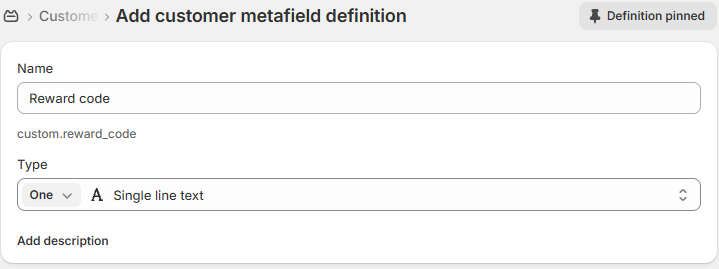
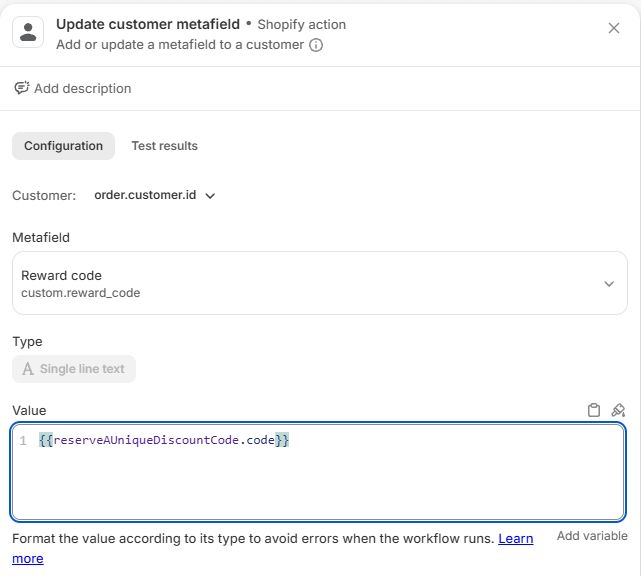
Each workflow saves the code on the customer in a metafield, custom.reward_code. Your marketing email, or any email app, can then read it. Create the metafield once, under Settings › Metafields and metaobjects › Customers. If your email app has its own Flow action that accepts variables, such as Klaviyo, you can insert the code there directly instead.
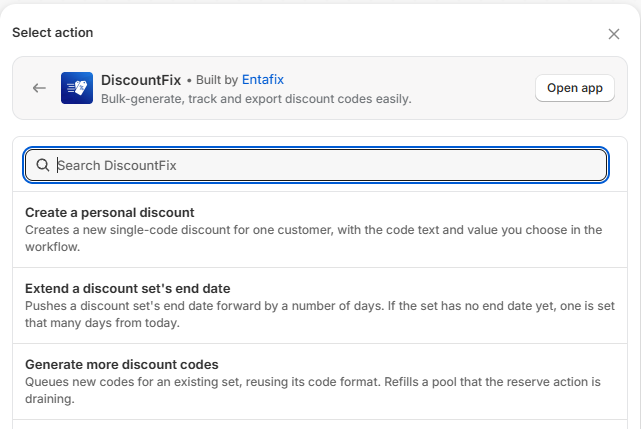
To add a DiscountFix step, click + under a step, choose Action and search for "DiscountFix":
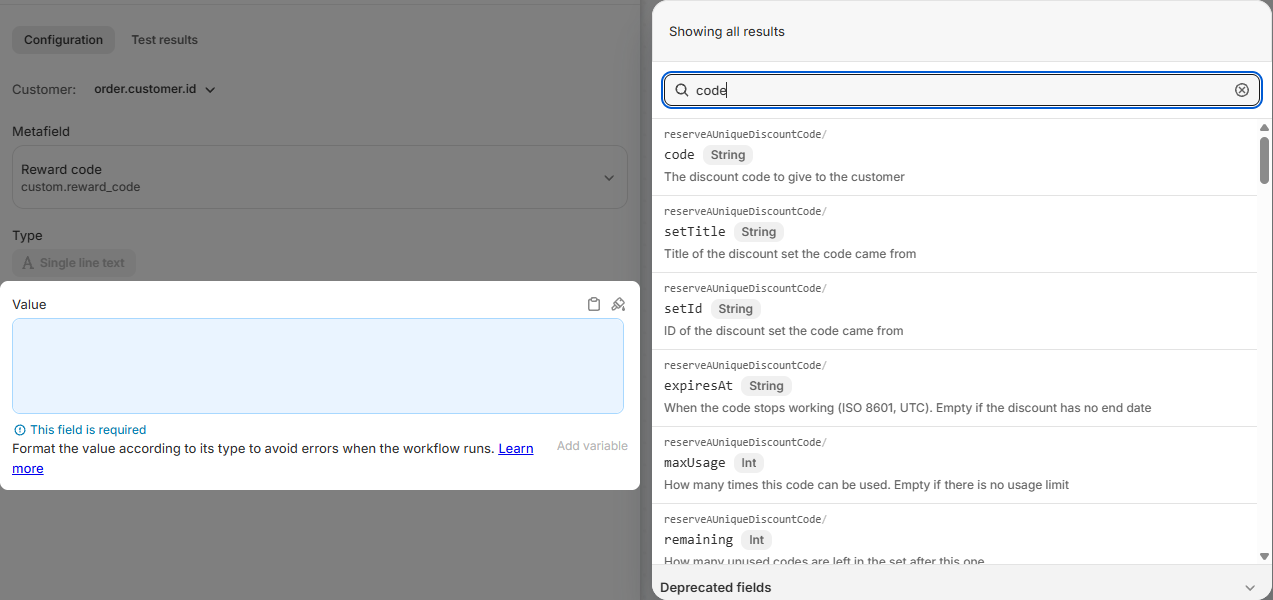
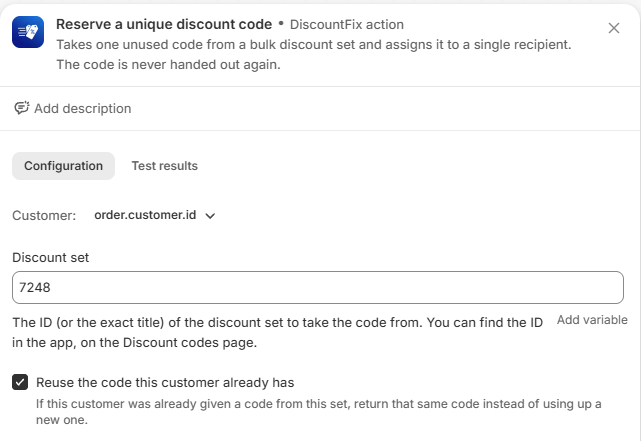
To put the code into a later step, click Add variable in that step and pick code under the DiscountFix step. The inserted variable is {{reserveAUniqueDiscountCode.code}} for Reserve, or {{createAPersonalDiscount.code}} for Create a personal discount.
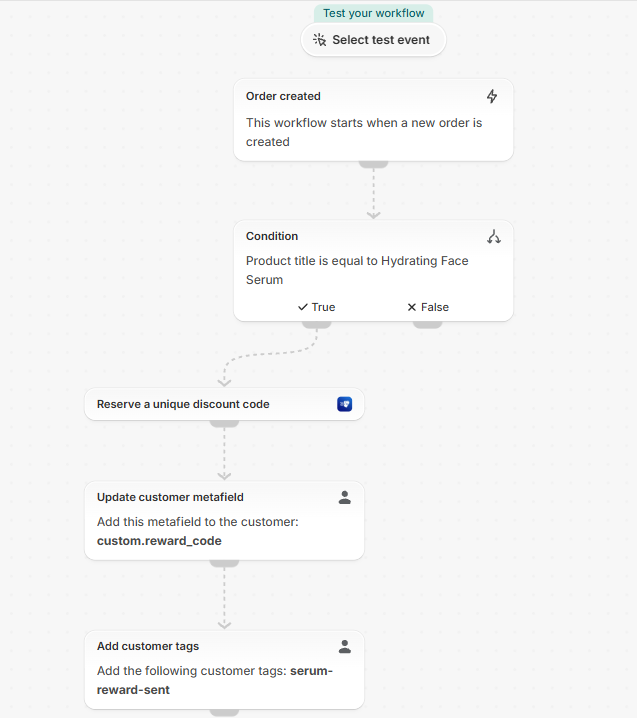
1. Customers who buy a product get a code for their next order
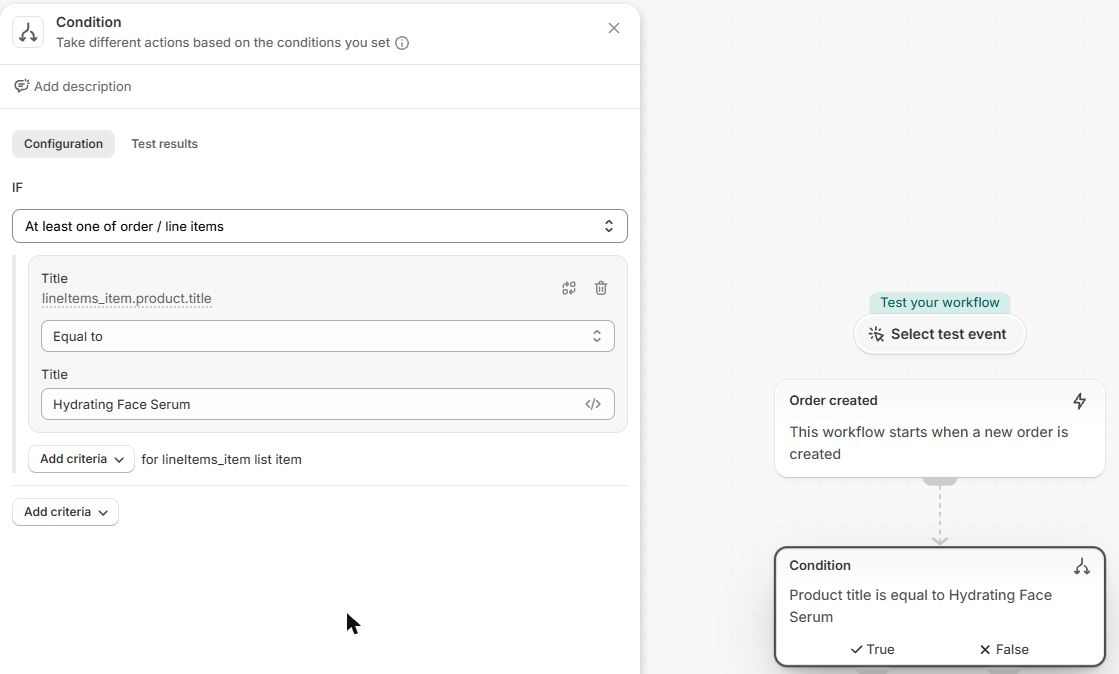
Someone buys "Hydrating Face Serum"; they get a unique code to use next time.
- Trigger: Order created.
- Add a Condition. Click Add a variable and choose
order / lineItems / product / title. Flow switches to At least one of order / line items. Set Equal to and type the product title. - In the True branch, add Reserve a unique discount code. Customer fills in as
order.customer.id. Enter your set ID and tick Reuse the code this customer already has. - Add Update customer metafield: Metafield = Reward code, Value = the
codevariable from the Reserve step. - Optional: Add customer tags, e.g.
serum-reward-sent, then send your email.
For a group of products, tag them in Shopify and check order / lineItems / product / tags instead of the title.
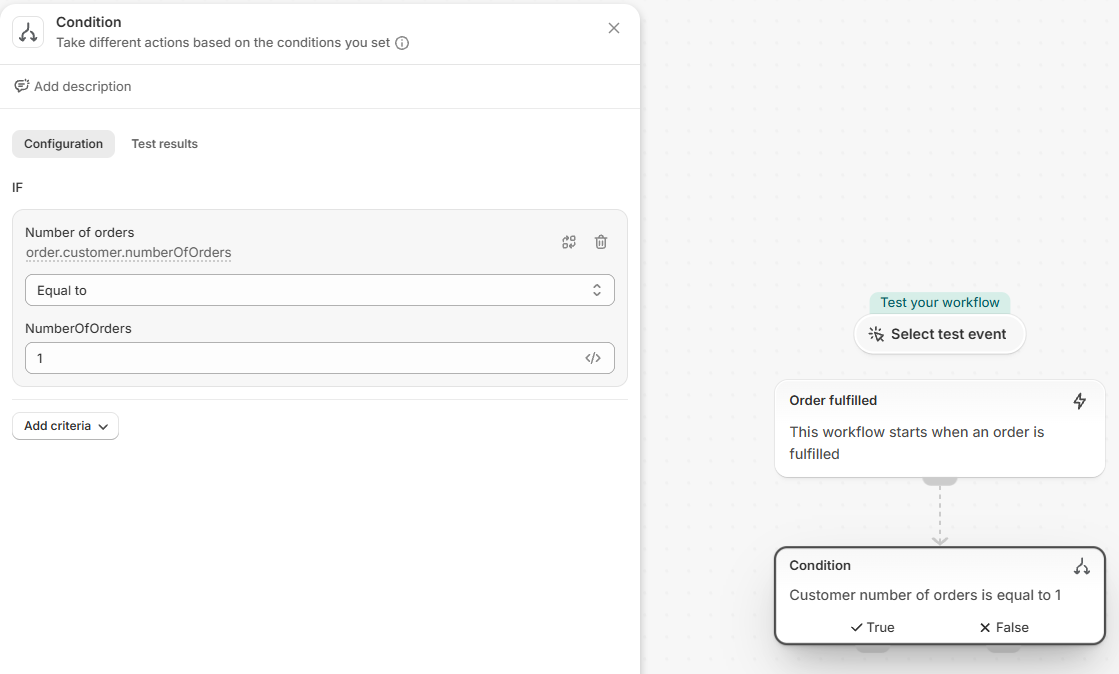
2. Second-order incentive after the first delivery
When a customer's first order is fulfilled, send a 15% code valid for 30 days to bring them back.
- Trigger: Order fulfilled.
- Condition:
order / customer / numberOfOrdersEqual to1. - Create a personal discount: Discount code
COMEBACK-{{order.customer.firstName}}, Always add a random block on, Percentage discount on, value15, Valid for (days)30, Times the code can be used1. - Update customer metafield: Reward code =
{{createAPersonalDiscount.code}}.
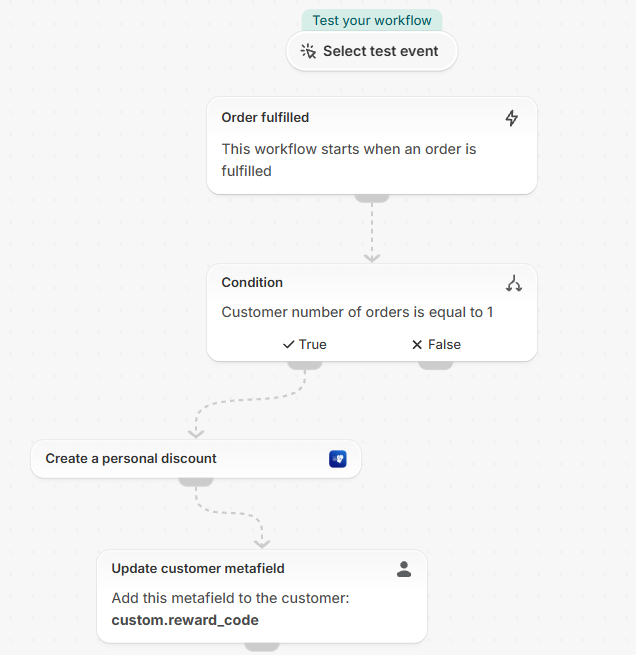
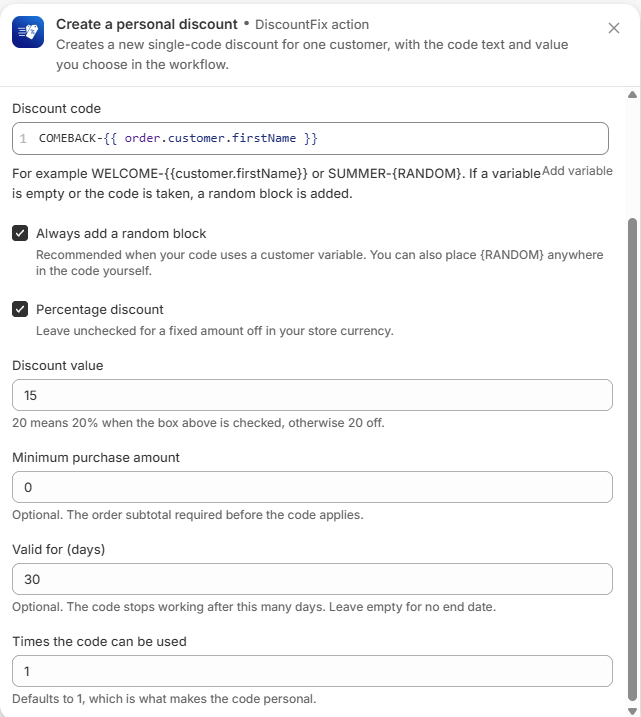
When you type {{ in the code field, Flow adds the closing }} for you. Type only COMEBACK-{{order.customer.firstName.
3. Code for an abandoned checkout
When a known customer leaves checkout, send a 10% code that expires in 2 days, once per customer.
- Trigger: Customer abandons checkout. Shopify fires it only for checkouts with a known customer (email or account).
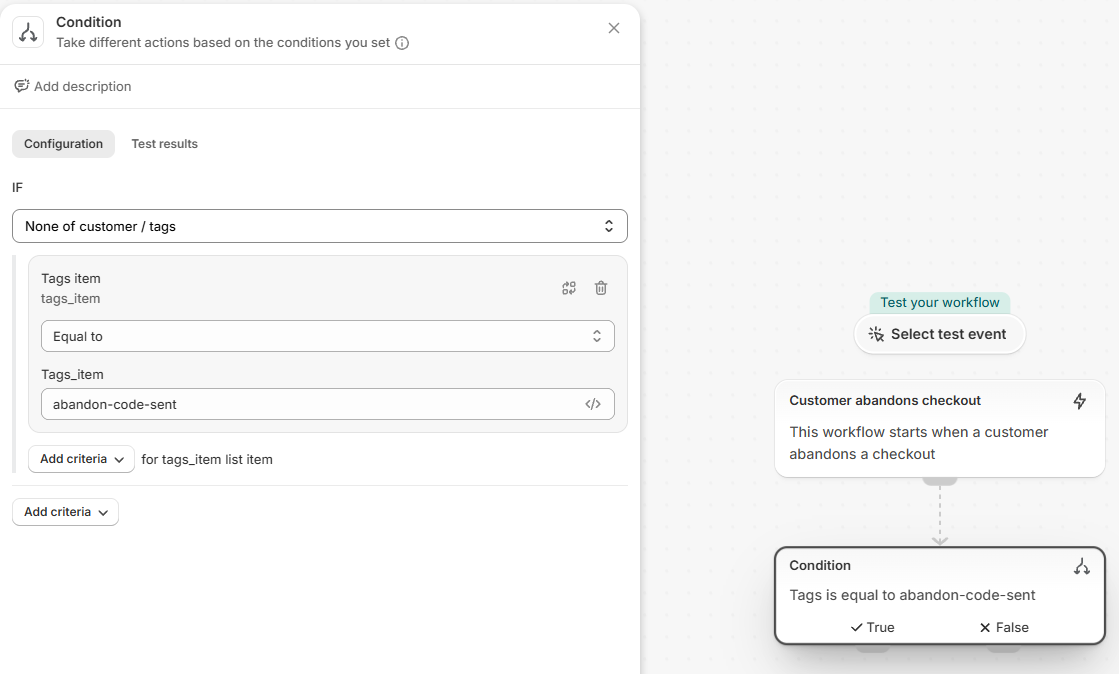
- Condition:
customer / tags. Change At least one of to None of, then Equal toabandon-code-sent. - Create a personal discount: code
SAVE10-{RANDOM}, Percentage discount on, value10, Valid for (days)2, uses1. - Update customer metafield with the code, then Add customer tags:
abandon-code-sent.
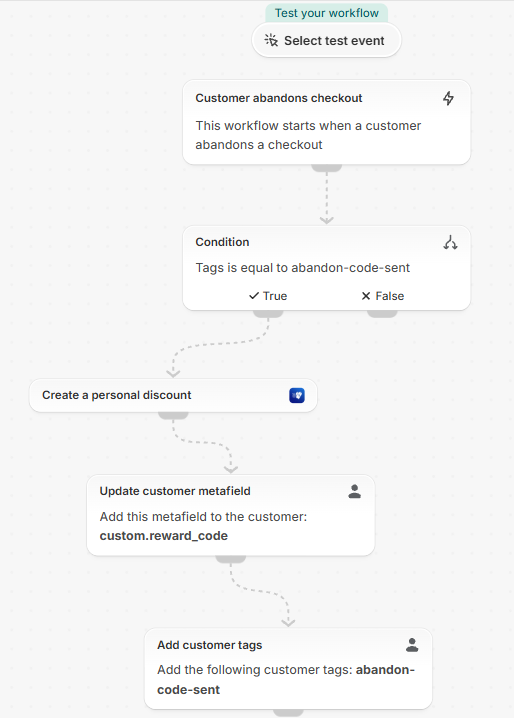
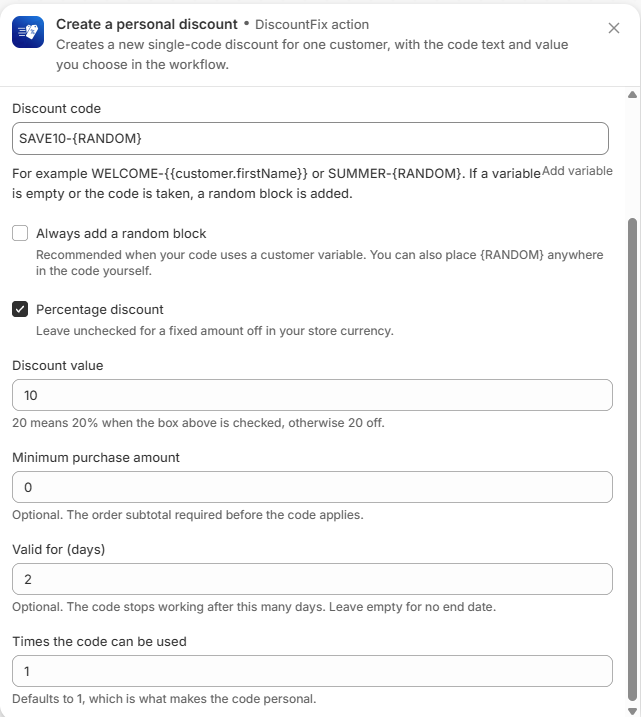
Shopify sends its own abandoned-checkout emails too. Turn those off, or put a Wait step before the DiscountFix step so customers aren't emailed twice at once.
4. VIP reward when lifetime spend passes a threshold
When a customer's total spend reaches 500, send a one-time 25-off code.
- Trigger: Order created.
- Condition:
order / customer / amountSpent / amountGreater than or equal to500. Click Add criteria → AND, chooseorder / customer / tags, set None of, Equal tovip-reward-sent. - Create a personal discount: code
VIP-{{order.customer.firstName}}, random block on, Percentage discount off, value25, valid90days, uses1. - Update customer metafield with the code, then Add customer tags:
vip-reward-sent.
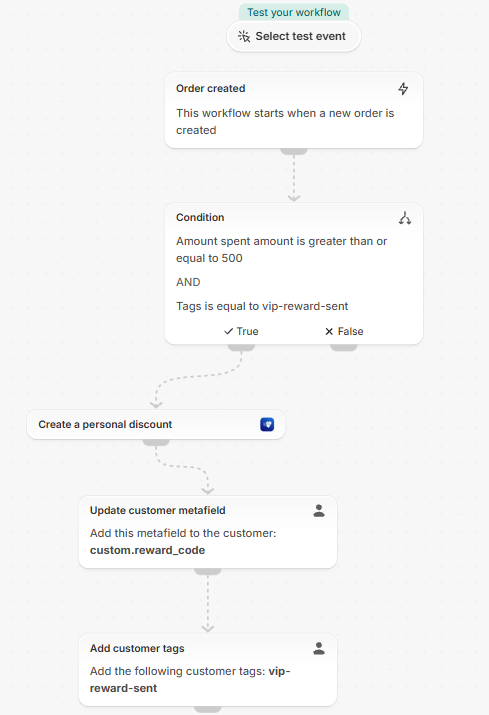
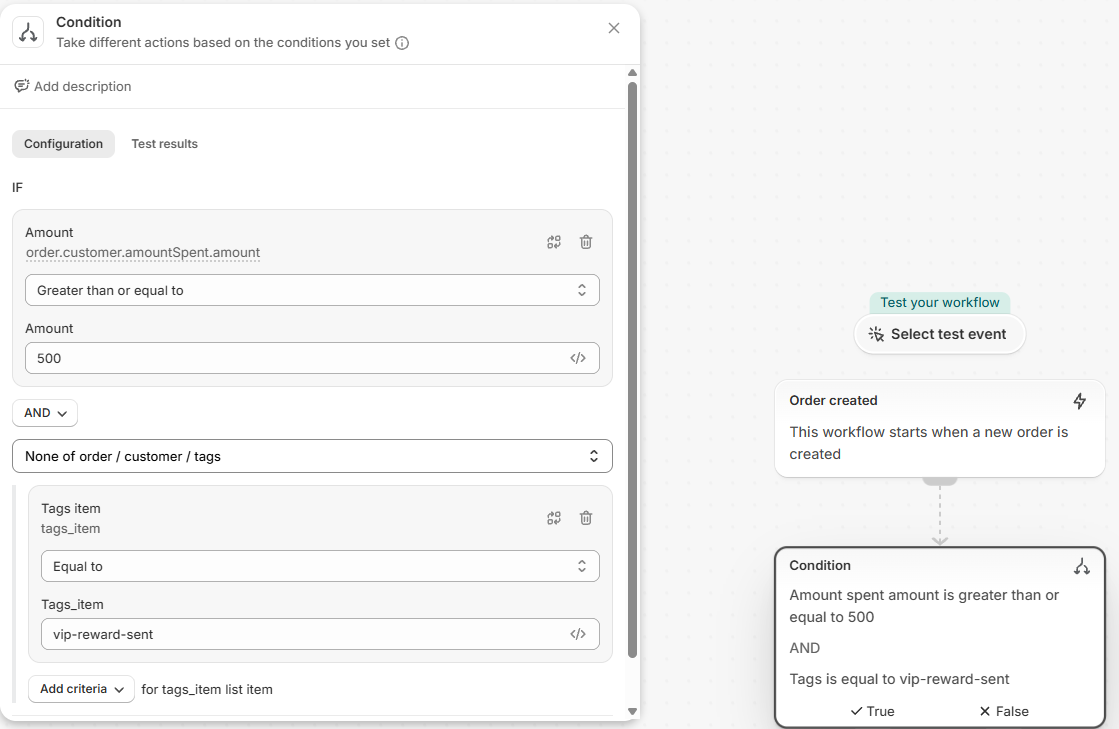
Amount spent is in your store currency. The tag makes sure the reward goes out once, not on every order after the threshold.
5. Nudge customers who signed up but never ordered
Every day, find up to 100 customers with no orders who haven't had a nudge yet, and give each of them a code.
- Trigger: Scheduled time. Pick a start time and click Add repeat → every 1 day.
- Get customer data: Maximum number of customers
100(the limit per run). Under Select a query choose Advanced and enterorders_count:0 AND tag_not:'nudge-code-sent'. - For each loop (iterate): Items =
Get customer data. - In Repeat for each item, add Reserve a unique discount code. Customer fills in as
getCustomerDataForeachitem.id. Enter your set ID and tick Reuse. - Add your email or metafield step, then Add customer tags:
nudge-code-sent, so tomorrow's run skips them.
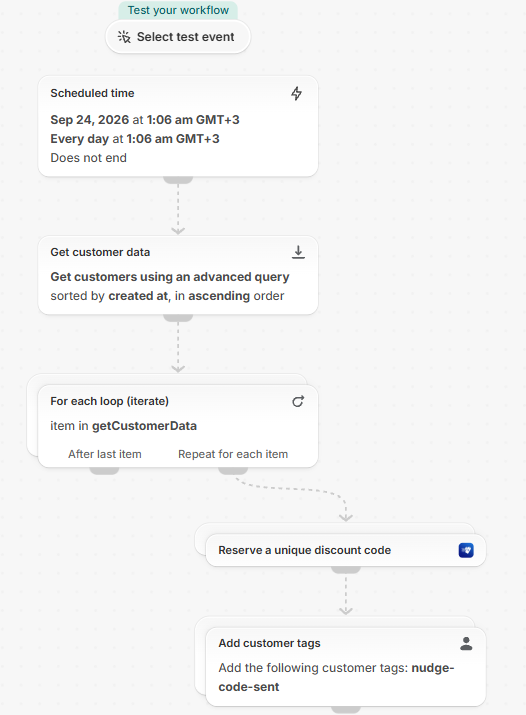
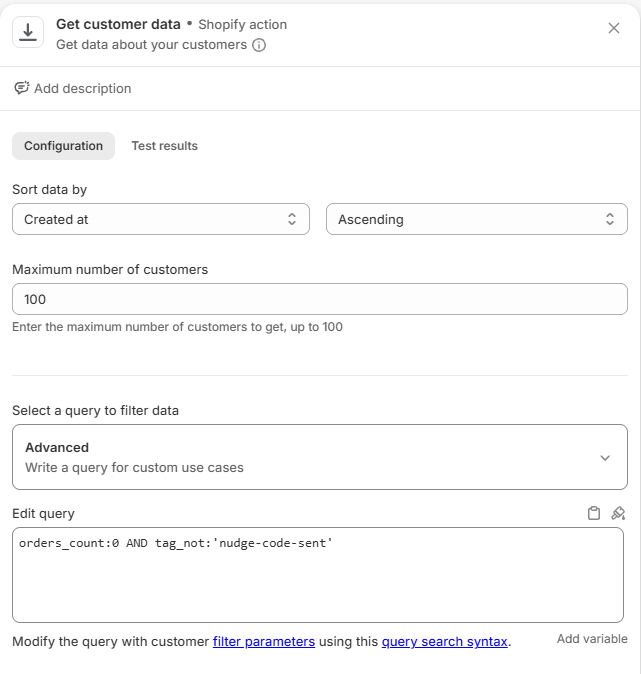
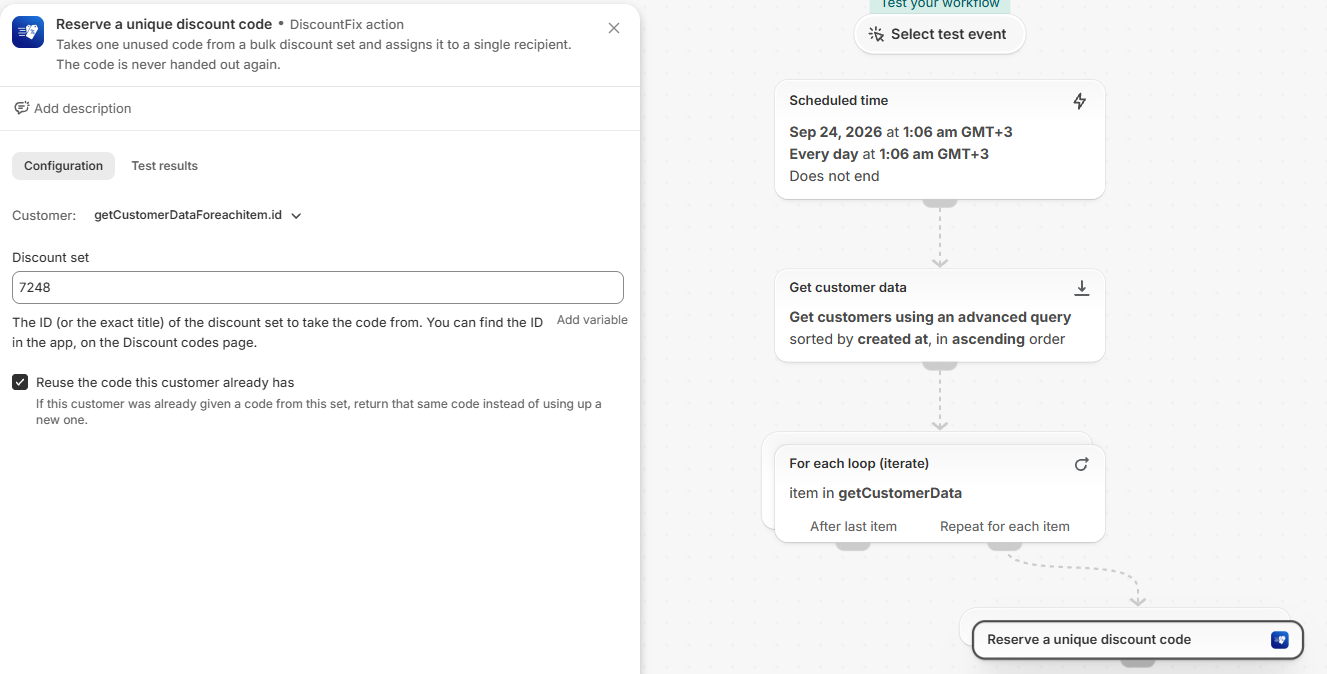
The query uses Shopify's customer search filters. Add AND accepts_marketing:true to reach only email subscribers.
6. Send a code by tagging a customer
Support or sales adds the tag send-code to a customer in Shopify; the customer gets a code, and the tag is removed so it can be used again.
- Trigger: Customer tags added.
- Condition: the trigger's own
tags(the tags just added, at the top of the variable list). At least one of, Equal tosend-code. - Reserve a unique discount code for the customer, with Reuse off so each tagging gives a new code. Set it up like scenario 1.
- Update customer metafield with the code, then Remove customer tags:
send-code.
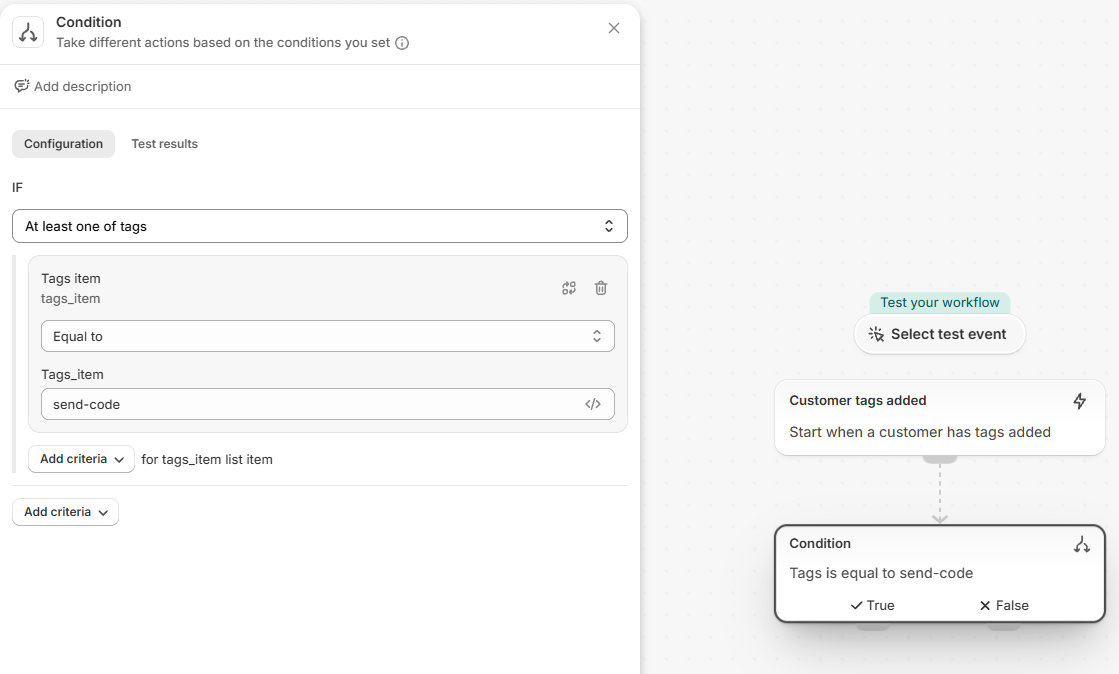
Handy for customer service: a customer complains, your team tags them, and the apology code is sent without anyone opening DiscountFix.
Seeing results in the app
| Where | What you see |
|---|---|
| Discount codes page | Every set shows its ID under the title. Sets with reserved codes show a person icon button with the reserved count. |
| Reserved codes screen (person icon on a set) | Which code went to which customer, when it was reserved, and whether it has been used. Searchable by code or customer. |
| Flow Discounts page (app navigation menu) | Every discount made with Create a personal discount. These are kept off the main Discount codes list so hundreds of single-code discounts don't clutter it. |
| Shopify Flow → workflow → Recent runs | Each run with the input and returned data of every step, plus the error message if a step failed. This is the first place to look when something didn't happen. |
Retries & reliability
- Temporary problems are retried by Flow automatically, for up to 36 hours. Examples: a short network issue, or a set that is still being generated. The run shows as retrying in Flow. You don't need to do anything.
- Permanent problems fail immediately and aren't retried. Examples: a wrong set ID, an empty pool, a used-up monthly allowance, or an invalid value. The run shows the error message, and you need to fix the cause. See Error messages.
- Retries never double up. A retried Reserve returns the same code. A retried Extend, Generate or Personal discount run doesn't add days, codes or discounts a second time.
- Triggers are sent once per event. Code redeemed doesn't fire again if Shopify re-sends the same order. The hourly triggers remember what they already reported.
Error messages
These appear in the Flow run log when a DiscountFix step fails.
| Message | Action | What to do |
|---|---|---|
Discount set is required | Reserve, Generate | Fill in the Discount set field. If you used a variable, check it isn't empty for this run. |
SET_NOT_FOUND / Discount set not found | Reserve, Generate, Extend | The ID or title doesn't match a set in this store, or the set was deleted. Copy the ID from the Discount codes page. |
NO_CODES_LEFT | Reserve | The pool is empty. Add codes to the set, and set up the refill recipe. |
Use the numeric discount set ID for this action | Generate, Extend | These actions don't accept a title. Enter the number shown as ID: on the Discount codes page. |
How many codes must be at least 1 | Generate | Enter a whole number of 1 or more. |
You can queue at most 50000 codes in a single step | Generate | Lower the number, or use several steps. |
Monthly code limit reached… | Generate, Personal | Your plan's monthly allowance is used up. It resets on the 1st of each month, or you can upgrade. See Plans & limits. |
This discount set failed to generate, so codes can't be added to it | Generate | Create a new set in the app and point the workflow at it. |
This discount set is still waiting to be generated. Flow will retry. | Generate | Nothing. Flow retries automatically. |
Days to add must be between 1 and 3650 | Extend | Use a whole number in that range. |
This discount set has no start date on record… | Extend | Change this set's dates in the app instead. |
Discount code is required | Personal, Release | Fill in the code field, or check that the variable you used isn't empty. |
Discount value must be greater than 0 | Personal | Enter a value above 0. If you used a variable, check its value in the run log. |
A percentage discount can't be more than 100 | Personal | Lower the value, or untick Percentage discount for a fixed amount. |
| Any other message | Personal | This is Shopify's own reason for refusing the discount, shown as-is. |
Limits at a glance
| What | Limit |
|---|---|
| Monthly code allowance | Free 250 · Premium 5,000 · Pro 10,000 · Unlimited: no limit. Used by Generate more (per code) and Personal discount (1 per run). Reserve doesn't use it. |
| Codes per Generate step | 1 – 50,000 |
| Extend days | 1 – 3,650 |
| Personal code length | Up to 60 characters |
remaining count | Counted up to 10,000 (see remainingCapped) |
| Running low | Checked hourly; at most once per 24 h per set (once a week when empty) |
| Expiring soon | Checked hourly; 7 days before the end date; once per end date |
| Batch finished | Checked hourly; batches from the last 2 days |
| Reserved code expired | Checked hourly; once per code, only unused codes with Valid for (days) |
| Code possibly leaked | Checked hourly; once per code; not for guest checkouts |
| Flow retries | Temporary failures retried by Flow for up to 36 hours |
FAQ & troubleshooting
Can a code expire a few days after I send it, instead of on one fixed date?
Yes. A set's end date is the same for every code, but in Flow you can give each customer their own deadline. In Reserve a unique discount code (or Create a personal discount) fill in Valid for (days). The welcome code recipe shows the full setup, including how to put the deadline in the email.
A customer says their code is "invalid", not "expired".
That is expected for codes reserved with Valid for (days). Codes in a set share one Shopify discount, and Shopify can't give a single code its own end date, so DiscountFix deletes the code at its deadline. Shopify then shows its generic "Enter a valid discount code" message. The set's Reserved codes page shows the code as Expired. To send such customers a new code automatically, use recipe 7.
Can DiscountFix create gift cards?
No. DiscountFix creates discount codes. For a "$25 reward", use Create a personal discount with a fixed amount of 25. It works like a gift card at checkout. The difference is that a gift card keeps a balance across several orders, while a discount code is used in full on one order. If you need a real gift card, it has to be issued by Shopify itself.
I can't find the DiscountFix actions in Flow.
Make sure DiscountFix is installed and you've opened it at least once from your Shopify admin. Then reload the Flow editor and search for "DiscountFix" or the action name (e.g. "Reserve"). Actions appear under Action, and triggers under Select a trigger.
Where do I find the Set ID?
On the Discount codes page of the app, directly under each set's title (ID: 1234). Codes you added later to a set belong to the same pool, so use the main set's ID.
How do I put the code in an email?
In your email step, click Add a variable, open the DiscountFix step (e.g. Reserve a unique discount code) and choose code. The email step must come after the DiscountFix step in the same branch, or the variable won't be listed.
This works with email apps whose Flow action accepts variables, such as Klaviyo. For Shopify's own marketing emails, see the next question.
Can I put the code in a Shopify marketing email?
Not directly. Shopify's Send marketing email action doesn't read data from earlier Flow steps, so a code variable inserted into the email arrives empty. Save the code on the customer first, and read it in the email:
- Once: in Shopify, go to Settings › Metafields and metaobjects › Customers and add a definition: name Reward code, namespace and key
custom.reward_code, type Single line text. - In the workflow, right after the DiscountFix step, add Update customer metafield: Customer = the order's customer, Metafield =
custom.reward_code, Value = Add a variable → the DiscountFix step →code. - In your email template, insert the customer metafield
custom.reward_codewhere the code should appear. - Put Send marketing email after the metafield step, in the same branch.
Customers who haven't subscribed to email marketing get a code, but not the email. To reach every customer, use an email app with its own Flow action and insert the code variable directly.
The workflow ran but the customer didn't get a code.
Open the workflow's Recent runs in Flow and click the run.
- If the DiscountFix step failed, the error message is shown. Check it in Error messages.
- If the DiscountFix step succeeded, the code was created or reserved, and the problem is in the email step or a condition before it. You can also check the set's Reserved codes screen, or the Flow Discounts page, to confirm the code exists.
Can a personal discount be limited to only that customer?
Not strictly. Shopify's current discount API doesn't let an app restrict a code to one named customer. The code is personal because it's unique, it's only sent to that customer, and it can be used once. If you need a hard restriction, create a set in DiscountFix that targets a customer segment, and hand out its codes with Reserve.
Can personal discounts apply to specific products or give free shipping?
No. Personal discounts are always an amount off the whole order. For product, collection, free-shipping or combined rules, create a set with those rules in DiscountFix and use Reserve a unique discount code.
Will the same customer get two codes if the workflow runs twice?
With Reserve, turn on Reuse the code this customer already has. The customer gets their earlier code back as long as it's unused. With Personal discount, add a customer tag at the end of the workflow and a condition at the start that skips customers who already have it.
Flow's own retries never create duplicates. That's covered automatically.
"Discount set running low" never fires.
It only watches sets that have handed out at least one code with Reserve a unique discount code, and only when the available codes fall below the threshold. It also skips sets whose end date has passed. It is checked hourly, so allow up to an hour.
"Discount code redeemed" didn't fire for an order.
- The code must have been created with DiscountFix: bulk sets, added codes, reserved codes and personal discounts. Codes created only in Shopify aren't tracked.
- It fires when the order is created. Draft orders fire it only once they become real orders.
- Check the workflow is turned on and has no condition that filters the order out. On guest orders, steps that use the customer fail. Add a Customer exists condition.
Can I use DiscountFix codes with a discount that already exists in Shopify?
Yes. In the app, open Discount codes → Add codes to an existing discount (how it works). The resulting set has an ID like any other, and you can hand out its codes with Reserve a unique discount code. Its settings, including value and dates, stay managed in Shopify, so change its end date there rather than with the Extend action.
Do Flow actions count toward my plan?
Only actions that create codes: Generate more discount codes (per code) and Create a personal discount (1 per run). Reserving, extending and releasing are free. See Limits.
Still stuck?
Contact us from the Contact us page or the chat inside the app. Include the workflow name and a screenshot of the failed run from Flow's Recent runs. We can see every DiscountFix Flow event on our side and will find out what happened.